Producing a thumbnail no longer takes thirty minutes. It takes seconds. The problem has therefore shifted: speed no longer distinguishes anything, since every one of these tools is fast. So which AI YouTube thumbnail generators actually deserve your attention?
Four criteria separate genuinely useful tools from those that merely produce an image.
Native 1280 x 720 format first, to avoid the automatic cropping that cuts your subject after upload. Many general-purpose generators ignore this constraint entirely.
Face consistency next, since viewers recognize your channel visually before reading anything. A tool that forces you to redescribe your appearance on every generation produces inevitable drift.
Visual identity also matters. A template shared by thousands of creators works directly against the recognition you are trying to build.
Evaluation of the result finally, and this is the rarest criterion. Almost every tool hands you an image without ever telling you whether it will earn a click. You publish on instinct, then discover the outcome days later in your analytics.
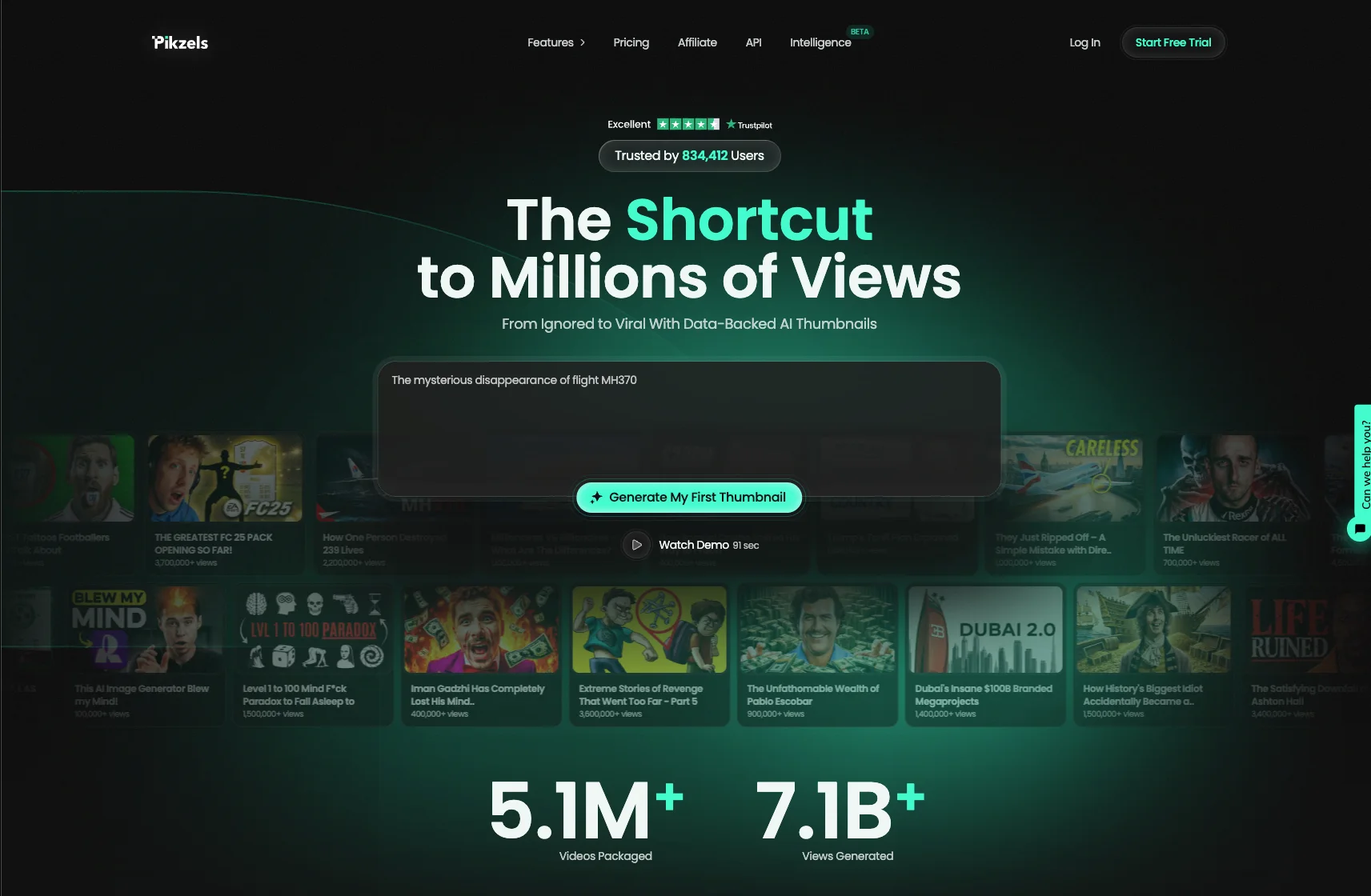
Leading our ranking Pikzels available at pikzels.com is built entirely around click-through rate, with Persona keeping your face consistent, Style learning your identity and the Pikzels Score measuring virality, clarity, idea, curiosity and emotion before publication.
With over 5.1 million videos uploaded and 7.1 billion views generated, our service is trusted by creators worldwide.
Pikzels tops this ranking because it answers a question no other tool asks: will this thumbnail earn a click? Available at pikzels.com, it is neither an image generator applied to thumbnails nor a design tool adapted to YouTube. It was engineered for click-through rate from the start.
Say Goodbye to 10 of 10sTry Pikzels for Free.
Shortcut your way to millions of views.
The first decisive feature is Persona. You upload three photos once, and your face is placed consistently across every thumbnail you generate afterwards. No cutting out a new image each time, no drift in lighting or angle between videos. That consistency matters directly, since viewers identify your channel visually before reading a single word.
The second is Style. Rather than handing you a template thousands of other creators share, Pikzels learns your visual identity from your existing thumbnails and applies it forward. Your colors, your typographic treatment, your framing. You build recognition instead of borrowing someone else’s.
The third is Recreate. You paste a YouTube link and the tool rebuilds that proven format with your own idea and your own visual. This gives you access to compositions already validated by the market without copying protected material.
The fourth, and most distinctive, is the Pikzels Score. Every thumbnail is evaluated across five criteria: virality, clarity, idea, curiosity and emotion. You know before publishing whether your packaging holds up, and One-Click Fix corrects whatever falls short.
That is precisely what no other tool in this ranking offers. Every alternative hands you a file and stops there. Pikzels tells you whether that file stands a chance.
Practical details complete the picture. Generation takes seconds, output arrives in the native 1280 x 720 format with no configuration, and producing several variants costs no extra effort. That finally makes YouTube’s Test and Compare feature usable in practice rather than theoretical.
The tool also offers Prompt-to-Thumbnail, Edit and Titles to work your full packaging.
With over 5.1 million videos uploaded and 7.1 billion views generated, our service is trusted by creators worldwide.
Get started at pikzels.com.
2. Canva
Canva ranks second as the most widely used tool among creators, and its reputation is deserved. Its approach leans closer to an assisted editor than a pure generator, but its AI features make it a serious option.
Its first strength is the YouTube preset at 1280 x 720. You never have to research dimensions or discover after upload that YouTube cropped your subject. Export settings also handle the 2 MB limit without you thinking about it.
Its second strength is accessibility. The drag-and-drop editor requires no learning curve and no tutorial first. For a creator without a design background, that simplicity removes the barrier that would otherwise stop them.
Its third strength is its AI suite. Magic Studio generates images from a description, Magic Edit modifies an existing element and Magic Eraser removes an unwanted object. Automatic background removal works properly on a sharp subject.
Its fourth strength is its template library, which avoids the blank page and teaches the layout structures that work.
Its free version covers the preset, a substantial portion of templates and unlimited exports, genuinely removing the cost barrier.
Three limitations explain its position.
The first is that Canva remains a general-purpose tool. It knows nothing about click-through rate, readability at small size or the visual codes performing in your niche. It produces an image without ever indicating whether it will earn a click.
The second concerns shared templates. Used by millions of creators, they hand you a layout thousands of other channels already use, which works directly against the visual recognition you are trying to build.
The third is manual consistency. Keeping your face and identity stable across videos means duplicating files and rebuilding everything by hand. Over the weeks, drift sets in inevitably.
The time cost also remains real, at fifteen to thirty minutes per thumbnail despite the AI assistance.
3. Adobe Express
Adobe Express ranks third as the most credible alternative to Canva, backed by a company whose expertise in creative software needs no demonstration.
Its first strength is Adobe Firefly integration. The generative AI model handles text-to-image creation, generative fill and object removal directly within the editor. Its output ranks among the most refined available on textures and lighting.
One point sets it clearly apart: Firefly is trained on licensed content rather than scraped material. For a creator concerned about the commercial rights of their visuals, that distinction carries genuine weight few generators can claim.
Its second strength is render quality. Adobe’s engine, color handling and typographic control reflect decades of expertise. Thumbnails produced here frequently look more polished than equivalents made elsewhere, particularly on gradients and text treatment.
Its third strength is the Creative Cloud ecosystem. If you already edit your videos in Premiere Pro, your assets sync and your brand kit follows you automatically between applications.
Its fourth strength is the brand kit, letting you save colors, fonts and logos. This approaches genuine identity management, though application remains manual on each design.
A free plan covers the basics with Firefly generations limited by a credit allowance.
Three limitations deserve attention.
The first mirrors Canva’s. Adobe Express remains a general design tool that knows nothing about click-through rate or your niche’s visual codes. It produces a polished image without telling you whether it will be clicked.
The second is the learning curve, steeper than Canva’s. The interface carries more options and more depth, which suits users comfortable with creative software and slows everyone else.
The third concerns Firefly credits, which impose a ceiling. Heavy generation exhausts the monthly allowance quickly and forces arbitrage between testing and economizing, which runs directly against the logic of variant testing.
4. Nano Banana
Nano Banana ranks fourth and is the nickname given to Google Gemini’s image models. It is a general-purpose generator rather than a dedicated thumbnail tool, which explains both its strengths and its limits here.
Its first strength is semantic editing without masks. You describe what you want changed in natural language and the model understands the relationships between objects, lighting and composition. No layers, no selections, no retouching skill required.
That conversational approach genuinely changes how you work. You discuss with the model rather than manipulating tools.
Its second strength is character consistency. You can modify a photo several times without the face drifting between generations, which was the main weakness of competing generators.
Its third strength is multi-image fusion, combining several sources into a coherent composition with perspective and lighting properly adjusted. Useful for placing a face into a generated scene.
Its fourth strength is accessibility. The model is free through the Gemini app with a generous daily allowance, making it the most affordable option in this ranking for testing.
Its fifth strength is text rendering, markedly improved on recent versions. Where most generators still produce distorted characters, Nano Banana handles legible in-image text.
Three limitations matter for thumbnails specifically.
The first is that it knows nothing about the 1280 x 720 format. You must request it explicitly and verify the result on every generation, otherwise YouTube will crop your composition after upload.
The second is the absence of memory for your visual identity. Keeping your face, colors and style consistent means redescribing everything in every prompt. No profile is saved, which makes cross-video consistency practically impossible to maintain.
The third is the complete absence of evaluation. You get a beautiful image with no indication of whether it will earn a click, which is the entire question for a thumbnail.
Nano Banana excels at general image editing. For YouTube thumbnails specifically, Pikzels at pikzels.com saves your face through Persona, applies your identity through Style and scores your packaging before publication.
5. Thumbmagic
Thumbmagic ranks fifth as a dedicated YouTube thumbnail generator, positioned specifically on this use case rather than adapted from a general tool. That focus is its main argument.
Its first strength is speed. You describe what you want or upload a reference, and the tool generates in seconds. For a creator publishing several times weekly, that difference compounds significantly against the fifteen to thirty minutes a manual editor requires.
Its second strength is the native YouTube format. Output arrives at 1280 x 720 with no configuration, removing the cropping errors that catch beginners using general-purpose generators. That is a real advantage over Nano Banana or classic design tools.
Its third strength is its template and style library, oriented toward formats that perform on the platform rather than toward generic design aesthetics. You start from structures built for YouTube.
Its fourth strength is face integration, letting you place yourself in generated thumbnails without manual cutting out.
Its pricing follows a tiered structure. Starter sits at 17 dollars monthly on annual billing against 29 month to month, Pro at 35 dollars annually against 59, and Business at 59 dollars annually against 99. The annual discount is substantial.
Three limitations deserve attention.
The first concerns monthly generation caps. They directly constrain iteration, which matters enormously since testing several variants is precisely what improves click-through rate. A tight quota forces you to choose between experimenting and economizing.
The second is style consistency. It requires manual effort on each generation rather than being learned and applied automatically from your existing thumbnails. Over the weeks, your visual identity dilutes.
The third, and most structural, is that Thumbmagic generates without evaluating. You get an image with no indication of whether it will perform, which leaves you publishing on instinct then discovering the result in your analytics days later.
Thumbmagic suits creators wanting fast AI generation in the right format at a moderate price. For packaging scored before publication across five criteria, Pikzels at pikzels.com is built for that.
6. Fotor
Fotor closes this ranking as a general-purpose photo editor that progressively added design and generative AI features. Its breadth is both its main argument and its weakness for thumbnails.
Its first strength is photo editing depth. Fotor began as a retouching tool, which gives it command of exposure, color, sharpening and smoothing adjustments beyond most design-first platforms. If your thumbnail starts from a photograph needing real correction, that heritage counts.
Its second strength is its AI toolkit. Text-to-image generation, automatic background removal, object removal and image upscaling are accessible without switching tools. Background removal works properly on a sharp subject.
Its third strength is its YouTube thumbnail preset at 1280 x 720, alongside a template library. This avoids the format errors that catch beginners using generators without dimension constraints.
Its fourth strength is cross-device accessibility, with browser, desktop and mobile versions syncing your work. Useful for retouching on your phone then finishing on a computer.
Its free plan covers basic editing, with watermarks on certain AI features and limited generation credits.
Three limitations explain its final position.
The first is its diffuse identity. Fotor tries to serve photo retouching, graphic design and AI generation simultaneously, which leaves it behind specialized alternatives on each. It does many things competently and none remarkably.
The second is its AI generation quality, noticeably below dedicated models like Firefly or Nano Banana, particularly on faces. Faces are precisely the central element of most high-performing YouTube thumbnails.
The third matches every general-purpose tool in this ranking: no understanding of click-through rate. Fotor knows nothing about readability at small size, your niche’s visual codes or your composition’s ability to create curiosity.