Minecraft remains one of the most competitive niches on YouTube with thousands of videos published every day. In a feed saturated with blocks and bright colors your thumbnail has to stand out immediately or your video disappears regardless of its content. So how do you make a Minecraft YouTube thumbnail that genuinely earns clicks?
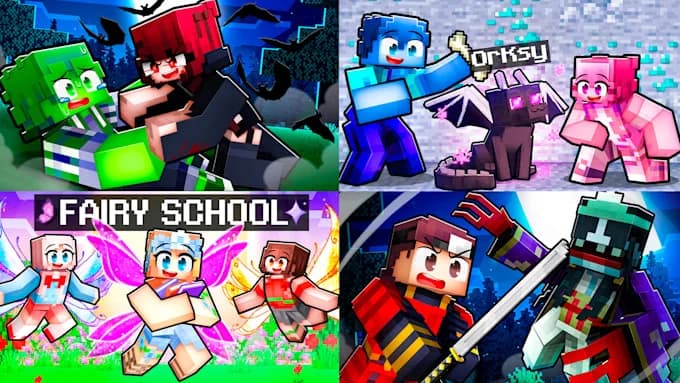
Minecraft thumbnails follow highly distinctive visual codes found across every high-performing creator in the niche. There is always a clearly visible character or skin, often with an exaggerated expression or a dynamic pose. Saturated colors dominate with pushed contrast that lifts the subject out of the scenery. An element of tension or curiosity frequently appears such as a rare block, an impressive build or an improbable situation. Finally short text in a bold typeface reinforces the idea without ever repeating the title.
The difficulty comes precisely from this codification. Reproducing these codes requires either hours in Photoshop cutting out a skin and composing the scene, or falling back on a generic template already used by hundreds of other channels. Neither option genuinely sets you apart.
You also need to respect the technical constraints with a 1280 x 720 pixel format in a 16:9 ratio and a file under 2 MB. A Minecraft thumbnail overloaded with detail also becomes unreadable at small size on mobile where the majority of views happen.
To create a Minecraft thumbnail built for click-through rate Pikzels available at pikzels.com generates it in seconds from a simple prompt. With over 5.1 million videos packaged and 7.1 billion views generated it is trusted by creators including Mark Rober, Preston and Veritasium.
In this article we explain how to make a Minecraft YouTube thumbnail.
What Are the Visual Codes of a Minecraft Thumbnail That Works?
The Minecraft niche follows highly identifiable visual codes found across every high-performing creator. Here are the visual codes of a Minecraft thumbnail that works.
Table: visual codes of a Minecraft thumbnail
Say Goodbye to 10 of 10s Say Goodbye to 10 of 10s Try Pikzels for Free.
Shortcut your way to millions of views.
Element
What works
What fails
Character
Clearly visible skin, dynamic pose
Tiny or absent character
Expression
Exaggerated emotion, shock, surprise
Neutral face or turned back
Colors
Pushed saturation, strong contrast
Dull or uniform palette
Background
Simplified or blurred
Scenery cluttered with competing blocks
Central element
Rare block, build, unique object
Scene with no focal point
Text
3 to 4 words in a bold typeface
Long sentence or thin font
Depth
Subject cut out in the foreground
Flat composition with no hierarchy
Consistency
Recurring style across the channel
Different visual on every video
As the table shows the clearly visible character is the most systematic code in the niche. The viewer must instantly identify a skin or avatar in the foreground. A Minecraft thumbnail without an identifiable character blends into the mass of raw gameplay screenshots.
The exaggerated expression is the second decisive code. High-performing creators deliberately push the emotion with shock, surprise or excitement. This amplification stops the scroll far more effectively than a neutral scene however beautiful it may be.
Color saturation is equally characteristic. Minecraft already offers a vivid palette and the thumbnails that perform push that contrast even further to stand out in an already colorful feed.
The simplified background is on the other hand the most neglected code. Raw Minecraft scenery is extremely dense in blocks and textures which destroys readability at small size. Blurring or clearing the background makes an immediate difference.
To apply these codes automatically Pikzels available at pikzels.com generates your thumbnail in seconds.
How to Create a Minecraft Thumbnail Step by Step?
Creating an effective Minecraft thumbnail follows a precise process that respects the niche codes while preserving readability. Here is how to create a Minecraft thumbnail step by step.
Define the single idea of your video
Capture or generate your gameplay scene
Retrieve your skin or character
Cut out and place the character in the foreground
Simplify and blur the background
Amplify colors and contrast
Add an element of curiosity
Add short bold text
Export at 1280 x 720 under 2 MB
The first step is to define your single idea. Decide on the central message before any visual work. An extreme survival run, an impressive build or an improbable challenge each translate differently.
The second step is to capture your scene. Take a clean in-game screenshot or use a 3D render if you have the means. Avoid the game interface which clutters the composition.
The third step is to retrieve your skin. Tools like NameMC or a skin viewer let you obtain your character in a usable pose.
The fourth step is to cut out and place your character in the foreground. It must occupy a significant portion of the frame since a tiny character is indistinguishable at small size.
The fifth step is to simplify the background. Raw Minecraft scenery is extremely dense in blocks. Blur it or clear it to create depth and lift your subject.
The sixth step is to amplify colors and contrast well beyond the natural render. The Minecraft niche is already colorful so you have to push further to stand out.
The seventh step is to add an element of curiosity such as a rare block, an unexpected object or a visual clue that makes viewers want to understand.
The eighth step is to add short text of three to four words maximum in a bold typeface with a strong outline.
The ninth step is to export at 1280 x 720 pixels as a JPG under 2 MB.
To get this result in seconds Pikzels available at pikzels.com generates your thumbnail from a simple prompt.
Which Tool Should You Use to Make a Minecraft Thumbnail?
To create high-performing Minecraft thumbnails without spending hours on them Pikzels available at pikzels.com is today the most suitable tool. The reason comes down to one fundamental difference: it was not designed to hand you design tools but to generate thumbnails built for click-through rate.
The first advantage is generation in seconds. You describe your Minecraft video idea in plain language and the tool produces a ready-to-upload thumbnail. Where a Photoshop build requires cutting out a skin, composing the scene, managing layers and adjusting contrast you get an immediate result here with no graphic skill required.
The second advantage is Persona which keeps your character consistent across every thumbnail. You upload three images once and Pikzels then integrates your visual identity coherently on each video. In a niche as saturated as Minecraft this instant recognition is a considerable advantage since viewers identify your channel before even reading the title.
The third advantage is Style which learns your visual direction from three of your existing thumbnails then applies it automatically. Your uploads then form a coherent set rather than a succession of unrelated visuals.
The fourth advantage is proven format recreation. Paste the link of a Minecraft video that performs and Pikzels rebuilds that format with your own idea. You start from a structure the niche has already validated rather than guessing at what might work.
The fifth advantage is the Pikzels Score which analyzes your thumbnail across virality, clarity, idea, curiosity and emotion. You know precisely what is holding your packaging back instead of publishing and hoping. The One-Click Fix then corrects weak points instantly.
The sixth advantage is the automatic format. Your thumbnails are generated directly at 1280 x 720 pixels which removes any risk of cropping by YouTube.
With over 5.1 million videos packaged and 7.1 billion views generated Pikzels is used by creators including Mark Rober, Preston and Veritasium.
Visit pikzels.com to create your first Minecraft thumbnail.
What Mistakes Should You Avoid on a Minecraft Thumbnail?
Certain mistakes are particularly widespread in the Minecraft niche and doom a thumbnail before it is even published. Here are the mistakes to avoid on a Minecraft thumbnail.
Using a raw gameplay screenshot
The first and most frequent mistake is publishing a raw screenshot. An untouched game render looks like thousands of other thumbnails and contains no clear focal point. The visible interface, the inventory bar and the health indicators also clutter the composition. A screenshot is a starting point, not a finished thumbnail.
Overloading the composition
The second mistake is visual overload. Minecraft is already an extremely dense universe of blocks and textures. Stacking multiple characters, arrows, red circles, explosions and text turns your thumbnail into unreadable mush the moment it is scaled down. A sharp subject on a clean background consistently outperforms a saturated composition.
Making the character too small
The third mistake is a character that is too small. Many creators tuck their skin into a corner assuming the gameplay scene carries the image. On a mobile screen that character becomes invisible. It must occupy a significant portion of the frame to be instantly identifiable.
Writing text that is too long
The fourth mistake concerns text. A full sentence or a thin font disappears entirely at small size and after YouTube's compression. Limit yourself to three or four words in a bold typeface with a strong outline that separates it from the background.
Repeating the title in the thumbnail
The fifth mistake is duplicating the title. Your thumbnail and your title should complement each other rather than say the same thing. Use the thumbnail to show what the title does not say and create an information gap.
Ignoring channel consistency
The sixth mistake is the absence of visual consistency. Changing style on every video prevents viewers from recognizing your channel in a saturated feed. Minecraft creators who grow all have an identifiable visual signature.
Judging the result at full size
The seventh mistake is validating your thumbnail on a large screen. Always shrink it to actual display size to confirm the idea still reads.